
Secret Codes & Device Info
Smart AI Utility AppsLibraries & Demo
4.33.00 Reviews
- Version
- 1.13
- Installs
- 50.00K
- Age Rating
- Everyone
Screenshots
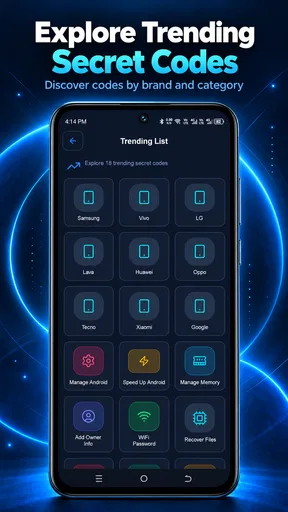
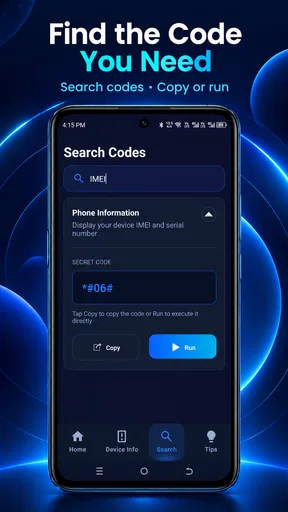
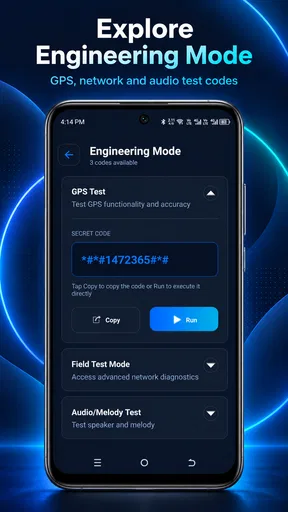
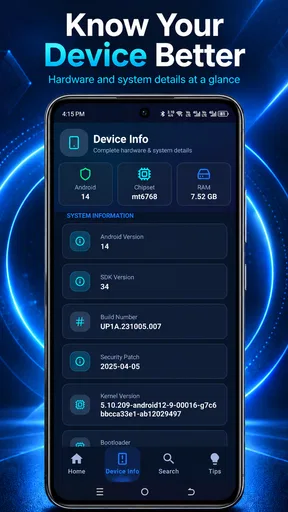
Our Review of Secret Codes & Device Info
 Analysis by Appyee
I approached Secret Codes & Device Info as a practical toolbox rather than an app I would open for entertainment. Its purpose is to bring together hidden phone codes, device details, hardware checks, battery information, and diagnostic tools in one place. That combination makes sense for anyone who regularly helps family members with Android phones, buys used devices, or simply wants a clearer picture of what is happening inside a handset.
The app is listed in the Libraries & Demo category, but I found its usefulness closer to a compact maintenance reference than a traditional library. It is free to install, rated for Everyone, and comes from Smart AI Utility Apps. Its current version is 1.13, and the minimum requirement is Android 7.0, so it is aimed at a broad range of phones rather than only recent hardware.
My overall impression is positive, with an important qualification: this is most valuable when you already have a specific question to answer. If you want a polished dashboard that constantly monitors every part of your phone, a dedicated diagnostic suite may be a better fit. If you want quick access to technical information and checks without searching through scattered menus, this app is much more appealing.
What the app feels like during everyday use
The first thing I noticed is that the app’s job is largely about reducing friction. Android already contains many useful details, but they are divided between settings pages, manufacturer menus, testing screens, and dialer codes. Secret Codes & Device Info gives those areas a more focused destination. That does not magically make every code universal, because phone makers and carriers can handle diagnostic commands differently, but it gives me a sensible place to begin.
Its strongest role is as a first-stop utility. I can imagine opening it before troubleshooting a battery complaint, checking whether a second-hand phone reports the expected hardware, or looking for a testing shortcut instead of searching the web for a code that may be outdated or unsuitable for a particular model. The real advantage is organization, not mystery: the app gathers technical routes that are otherwise easy to forget.
The store rating sits at 4.4 from around two hundred ratings, while the app has passed fifty thousand installs. Those figures suggest that it has found a modest but interested audience, rather than being a mainstream everyday essential. I read that as a clue about fit. This is a specialist helper for curious owners and troubleshooters, not an app most people need open every morning.
Speed expectations and the value of quick answers
For this kind of tool, perceived speed matters more than visual effects. I do not expect a code reference or device-information screen to demand much from the phone. The useful experience is reaching the relevant area quickly, reading a result without hunting through unrelated menus, and returning to normal phone use when finished.
That makes the app feel naturally suited to short sessions. A person checking a model identifier, looking at battery-related information, or preparing to test a sensor does not need a long setup process. The app’s purpose is narrow enough that it should be judged by how quickly it helps answer a question, not by how many minutes it can remain open in the background.
There is also a practical speed benefit when helping someone remotely. Instead of asking them to navigate several settings screens, I could direct them toward one utility and then ask them to read the relevant result. That can make a support conversation less confusing, especially when the other person is uncomfortable with technical menus. It is not a replacement for proper repair documentation, but it can shorten the first round of diagnosis.
One useful habit is to decide what I am checking before opening the app. Going in with a clear task—such as verifying a device detail or testing a suspected hardware area—keeps the session efficient. Browsing every code out of curiosity is possible, but it is less productive and increases the chance of launching something I do not fully understand.
Where heavier use can become more demanding
The app itself is likely to be light during ordinary reading and lookup tasks, but the phone tests are a different matter. Hardware diagnostics can involve the screen, sensors, vibration, audio, or other components, depending on what the device exposes. Even when the utility is simple, the testing process can require attention from both the software and the person operating it.
This is where I would avoid treating every option as a harmless experiment. A diagnostic screen is useful when I have a reason to inspect something, but repeatedly running tests does not provide much extra value. It can also make troubleshooting harder if I start several checks at once and forget which result belongs to which test. My preferred approach is one component at a time, with notes taken immediately when a result looks unusual.
Battery-related checks deserve the same measured approach. A single reading can help identify a possible problem, but it should not be treated as a complete health report by itself. Battery behavior changes with temperature, charging habits, network activity, screen brightness, and the age of the cell. I would use the app to spot clues, then compare them with what I actually experience during a normal day.
A realistic scenario would be buying a used Android phone from a local seller. Before handing over money, I could use the app to inspect device information, try relevant hardware checks, and compare the visible model details with the seller’s description. I would still check the phone’s account status, physical condition, camera quality, charging port, and network compatibility separately. The app can improve the inspection, but it cannot turn a quick software check into a complete second-hand buying guarantee.
Reliability depends on the phone as much as the app
The most important limitation is that secret codes are not guaranteed to behave identically across Android devices. Manufacturers may add, remove, redirect, or restrict certain commands. A code that works on one model may do nothing on another, open a different screen, or require a carrier-specific configuration. That is not necessarily a flaw in the app; it is a consequence of the Android ecosystem being fragmented.
For that reason, I would treat each code as an entry point rather than an authority. If a command opens a screen, I would read what it shows and avoid changing settings unless I understand the consequences. I would also be careful with options that appear to reset, erase, reconfigure, or alter network behavior. A reference tool is safest when used for observation first.
The same caution applies to device information. Basic identifiers and hardware details are useful for confirming what phone I have, but they should be cross-checked against the physical label, the system settings, or the original documentation when accuracy matters. This is especially important when diagnosing a refurbished phone or preparing a device for resale.
In my experience, reliability here means consistent guidance and sensible access, not a promise that every function will work on every handset. The app is more dependable as a centralized starting point than as a universal interpreter of every manufacturer’s internal behavior. That distinction helps set realistic expectations and prevents a failed code from being mistaken for a broken phone.
Useful workflows beyond simple curiosity
One of the more valuable workflows is creating a small inspection routine. I would begin with general device information, then move to the component that is causing trouble, and finally review battery or phone diagnostics. This order matters because it prevents me from testing blindly. Knowing the exact model and software context first gives the later results more meaning.
A second workflow is comparison over time. If a phone feels unusually warm or the battery seems weaker, I could make a note of the relevant information, use the phone normally, and revisit the same area later. The app is not a substitute for a formal service report, but consistent checks are more useful than one isolated glance. The key is to compare similar conditions rather than readings taken during completely different workloads.
A third use is helping a family member distinguish a software concern from a possible hardware concern. If calls are fine but a sensor or speaker behaves strangely, a focused test may narrow the conversation before the phone is taken to a repair shop. If the issue is intermittent, I would record exactly when it happens rather than relying on memory. That makes the app part of a troubleshooting process instead of a collection of disconnected buttons.
There is also a privacy-minded reason to use it carefully. Device details can be sensitive when shared in screenshots or support chats. Before sending any screen to another person, I would check whether it displays identifiers that do not need to be public. The app may help reveal information, but the user still decides what should remain private.
Device constraints and practical compatibility
Android 7.0 as the minimum operating system makes the app accessible to older phones, which is particularly relevant for used-device inspections and family support. At the same time, an older operating system may expose fewer diagnostics than a newer model, while a heavily customized manufacturer interface may behave differently from standard Android. The broad system requirement should therefore not be confused with identical feature behavior everywhere.
Phone hardware is another constraint. A test for a component that the device does not include cannot provide a meaningful result. Likewise, a dual-SIM phone, a rugged handset, or a model with unusual sensors may present information differently from a conventional phone. I would use the app alongside the specifications for the exact model, not as the only source of truth.
Resource demands should also be considered in context. A utility used briefly for information and checks is unlikely to need the same endurance as a navigation app, game, or continuous monitor. The heavier moments come from what I ask the phone to test, not from leaving a reference screen open for a few seconds. I would avoid running diagnostics while the device is already hot, charging under strain, or low on battery, because those conditions can complicate interpretation.
The free entry point is a strong reason to try it before deciding whether it belongs in a regular troubleshooting routine. There are in-app purchases ranging from $2.49 to $19.99 per item, so I would pay attention to which parts of the experience require an upgrade before assuming every tool is included without cost. For a casual user who only needs occasional device details, the free portion may be enough; a technician or frequent reseller should examine the available functions more closely before spending.
How it compares with the usual alternatives
The obvious alternative is Android’s own Settings app. Settings remains better for changing established options, reviewing permissions, managing accounts, and confirming system-level information from the operating system itself. I would always prefer it for actions that affect the phone’s configuration. Secret Codes & Device Info is more convenient when I want a consolidated technical reference or a guided route toward checks that are otherwise scattered.
Another alternative is searching the web for individual dialer codes. Online searching can produce more model-specific context, especially when a manufacturer has unusual behavior, but it also brings outdated pages, copied lists, and commands with unclear consequences. The app is more convenient for quick access, while a careful web search may be better when I need confirmation for one exact model. Using both together is more sensible than relying blindly on either one.
Dedicated hardware-testing apps can offer deeper component reports or more specialized visualizations. I would choose one of those when I need a formal, repeatable assessment or a feature that this compact utility does not cover. The advantage of this app is breadth and convenience: it combines secret-code access, device information, battery checks, and diagnostics without forcing me to install several narrowly focused tools.
Manufacturer support apps may also be preferable for warranty checks, official repair options, or brand-specific diagnostics. Those tools have a closer relationship with the phone maker’s own systems. Secret Codes & Device Info makes more sense when I want a neutral, general-purpose helper across different Android phones, particularly when I am helping someone whose brand I do not use regularly.
Who should use it, and who should skip it
I would recommend it to technically curious Android owners, people who buy or sell used phones, independent repair helpers, and anyone who often troubleshoots devices for relatives. It is especially handy when the problem is still vague and I need a structured way to inspect the phone before deciding whether the issue is software-related, hardware-related, or simply a misunderstanding of a setting.
I would be more cautious about recommending it to someone who wants a completely automatic health score. The app can expose information and provide tests, but interpreting the results still requires judgment. A user who is uncomfortable with technical labels may find the codes more confusing than helpful unless another person guides them.
I would also skip it if my only goal is changing ordinary settings or monitoring battery usage continuously. Android’s built-in controls and a dedicated battery tool are likely to be clearer for those jobs. The app earns its place when its combination of reference material and diagnostics solves a problem that the regular settings menus do not solve conveniently.
My performance and reliability verdict
After considering how it fits into real troubleshooting, I see Secret Codes & Device Info as a focused utility with sensible everyday value. Its speed expectations are modest and appropriate: it should be judged by how quickly it gets me to useful information, not by elaborate presentation. Its resource demands are most relevant during active hardware checks, while short lookup sessions should remain straightforward on compatible devices.
Its stability is best understood through the Android devices around it. The app can provide a useful route, but manufacturer differences, missing hardware, carrier restrictions, and software customization can affect what each code or diagnostic screen actually does. That means the app is reliable as a starting toolkit, not as a universal promise that every command will produce the same result.
The recovery mindset is important too. I would use the app conservatively, avoid changing unfamiliar settings, and stop a test if the phone behaves unexpectedly. For serious faults, I would preserve important data and seek official or professional support rather than treating a diagnostic result as a repair instruction. Used that way, the app helps me make better decisions without encouraging unnecessary experimentation.
Smart AI Utility Apps has created something more useful than the short label “Secret Codes” suggests. The free app is not essential for every Android owner, and the in-app purchase range means I would inspect the upgrade boundaries before committing to regular use. Still, for device inspection, targeted troubleshooting, and quick access to technical phone information, I find it worth trying. My recommendation is strongest for users who want practical answers, not passive monitoring.
In the end, I would keep it available for those moments when a phone behaves strangely, a used device needs checking, or a family member needs guided help. It does not replace Settings, manufacturer support, or a trained technician, but it can bridge the gap between casual guessing and a more informed first diagnosis. That is a useful place for a lightweight Android utility to earn space on my phone.
Verdict
Strengths of Secret Codes & Device Info
- Quickly displays detailed hardware and software information.
- Includes useful Android secret codes in one convenient place.
- Simple interface makes key device data easy to find.
- Helps users check sensors, battery status, and network details.
- Useful for troubleshooting and verifying device specifications.
Limitations of Secret Codes & Device Info
- Some codes may not work on every phone brand or Android version.
- Advanced menus can be confusing for inexperienced users.
- Certain tests may open sensitive system settings unexpectedly.
- Information accuracy depends on the device manufacturer’s support.
- Frequent ads may interrupt browsing and code lookup.
Similar Picks in This Category
View All
PGT: GFX, Launcher & Optimizer
Trilokia Inc.4.5

AusweisApp Bund
Governikus Service GmbH3.7

Cardboard
Google LLC3.2

Gamers GLTool with Game Tuner
Trilokia Inc.4.5

Multi Web Chat - Read Secretly
World Scan & Cleaner3.8

App Cloner Premium & Add-ons
App Listo1.9
Frequently Asked Questions
What is Secret Codes & Device Info used for?
Secret Codes & Device Info is an Android utility designed to help users access device information and, where supported, open hidden testing or configuration menus through special dialer codes. It can display details such as the manufacturer, model, Android version, battery status, network information, and hardware data. The exact options available depend on your phone brand, Android version, carrier, and regional firmware.
Can Secret Codes & Device Info unlock hidden features or improve my phone’s performance?
The app does not magically unlock premium features, remove restrictions, or make a device faster. It mainly provides convenient access to information and system codes that may already be available on the phone. Some codes open diagnostic or advanced settings, but their behavior varies considerably between manufacturers. Before changing anything, read the description carefully because certain menus can affect network settings, testing options, or stored device configuration.
Is Secret Codes & Device Info safe to use?
Using the app to view ordinary device information is generally low risk, but hidden codes can open technical menus that are not intended for casual experimentation. The safest approach is to avoid entering unfamiliar commands, changing network or radio settings, or performing resets unless you understand the consequences. Review the permissions requested by the app, install it from a reputable source, and keep a backup of important data before testing advanced functions.
Will all secret codes work on every Android phone?
No. Secret codes are not universal, even when they appear in the app’s list. Manufacturers such as Samsung, Xiaomi, Motorola, OnePlus, and others use different diagnostic systems, while carriers and Android updates may disable or modify particular commands. Some codes may simply do nothing, display an error, or open a menu with different options. Compatibility should therefore be checked on your specific model rather than assumed from another device.
Does Secret Codes & Device Info require root access or an internet connection?
Most basic features, including viewing common hardware and software details, normally work without root access. Access to certain system menus may also be possible without root, although Android restrictions and manufacturer policies can limit what the app can launch. An internet connection is generally not required for local device information or dialing supported codes, but advertisements, updates, or additional online content may require connectivity depending on the app version.
